These procedures will ensure consistent collection and updating of allergies, medical conditions, medication indications, and counselling note
To : All Staff
For All Patients
Please ensure the following information is documented in their profile
- Allergies and Intolerances
- Medical Conditions
To facilitate the collections of this information, please ask patients to complete the 
Refill Prescriptions
Ask and document the following information
- New allergies or reactions
- New medications (OTC, supplements)
- Change in health status
- Effectiveness and tolerability of current medications
To: Pharmacists
Clinicviewer
Review of Clinicviewer for high risk patients, including those with;
- >4 chronic medications
- Diabetes, cardiovascular disease, renal/hepatic impairment, cancer, transplant, autoimmune diseases
- High risk medications including anticoagulants, hypoglycemics, opioids and high risk analgesics, immunosuppressants, antipsychotics and medications with narrow therapeutic index.
- Frequent hospitalization
- Adherence issues
- Pregnancy or breast feeding
- Unclear indications
Use this information to confirm indications, identify medical conditions and identify any concerns.
Documents “Clinicviewer Reviewed” in patient’s file.
To: Pharmacy Manager
Ensure all staff are trained on this SOP. Conduct review of files every 3 months to ensure policy is adhered to and address non-compliance if necessary. Audit can be reduced to every 6 months if no issues are noted. Targets are as follows
| Audit Item | Target / Standard |
| Allergies documented | ≥90% of profiles |
| Medical conditions documented | ≥90% of profiles |
| Indications documented for all medications | 100% of new and high-risk meds |
| Counselling / assessment notes | Present for ≥80% of refills |
| Refill patient assessment done | ≥80% of refills |
| High-risk patient assessment documented | 100% |
| Clinical Viewer used when applicable | Documented in ≥90% of relevant cases |
| Documentation format consistent | All notes follow SOAP/DAP or structured template |
| Follow-up actions recorded | All issues addressed or scheduled |
Documentation Methods
Please enter information in a structurized format using either DAP or SOAP .
Clinical Notes
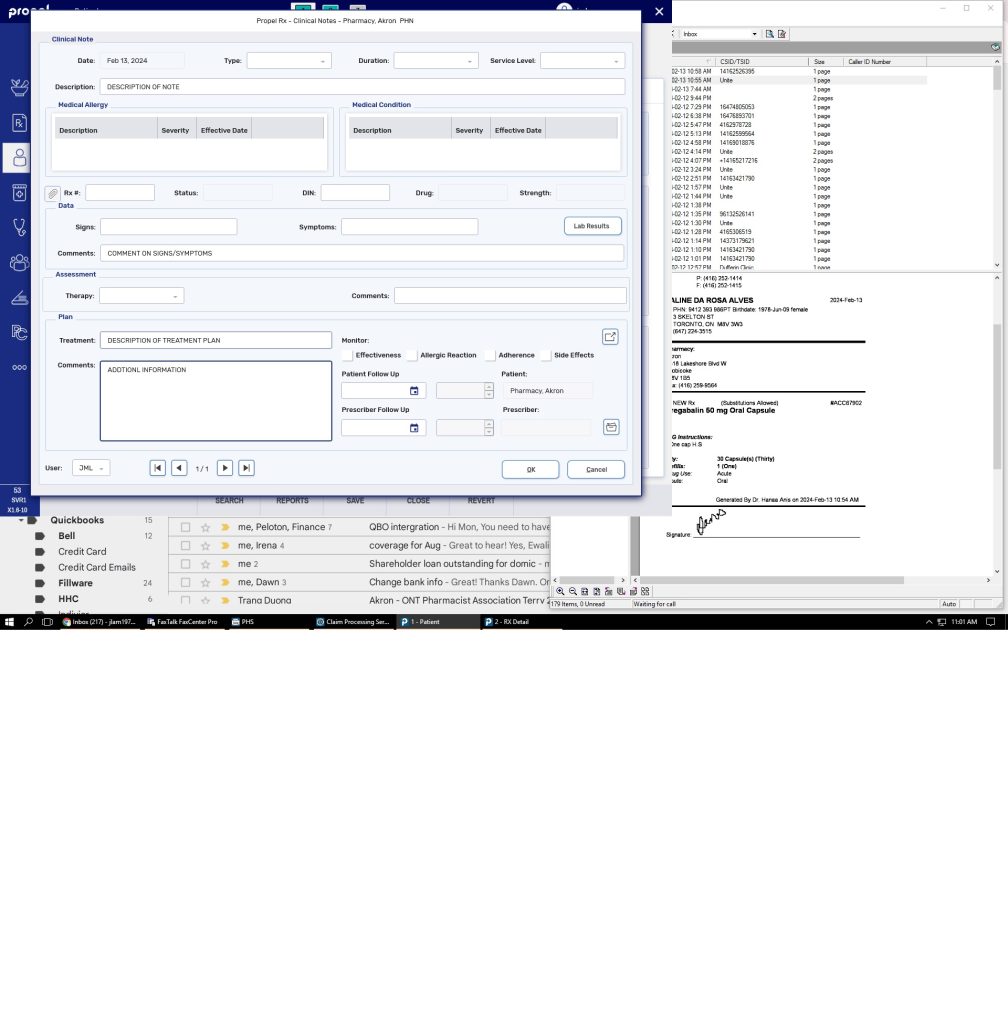
Clinical Notes allow you to document discussions with a patient or information about a patient such as consultations, drug related problems, adherence, follow-ups and immunizations on a Patient Folder.
These Clinical Notes provide you the ability to link these notes directly to a prescription and document any data, assessment and plans that you’ve discussed with a patient.
If a follow-up is recommended based on these conversations, it can be scheduled directly from the Clinical Notes window and is automatically added to the Activities tile.
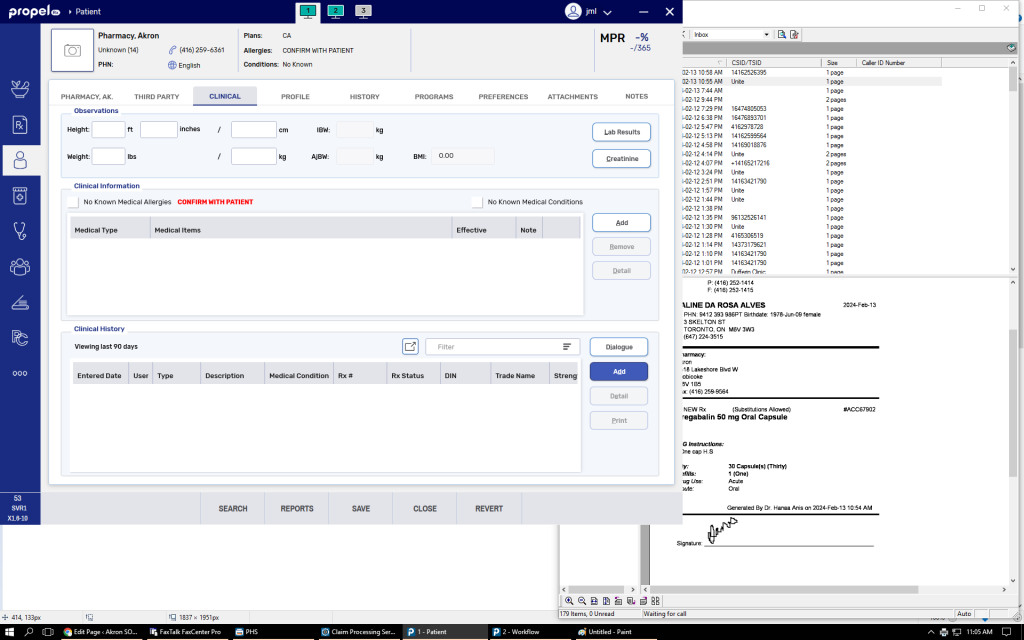
To add Clinical Notes:
- Search for and select the patient.
- Select the Clinical tab.
- Under Clinical History, select Add.The Clinical Notes window appears.
- From the Type dropdown, select the type of clinical note being added.
- Optional – enter information into the remaining fields of the Clinical Notes window.
- Select OK. The Clinical Notes window closes to the Clinical tab.Once OK is selected, the clinical note cannot be edited.
- Select Save.
Dialogue
To document counselling with respect to a particular prescription, open the patient’s profile.
Select ” RX ” then “Dialogue”
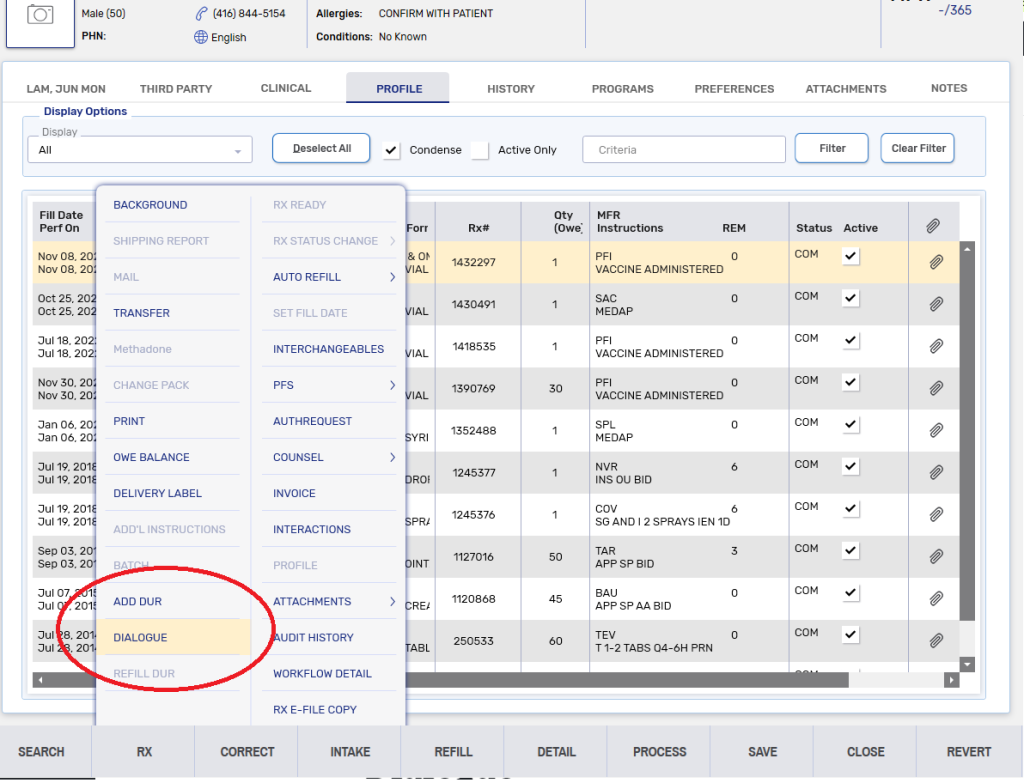
All dialogue documentation can be viewed in the Clinical Tab of the patient’s file
Medical Conditions
Enter any medical condition under the Clinical tab.
– Click “Add”
– Select “Condition”
– enter the medical condition and click “search”. If necessary use the wild character “%” to broaden the search
– Select the correct condition.